
plans section
In the plans section, describe the service's tariff plans using the following structure:
"plans": [{<PLAN_PARAMETERS>,"display": {},"billing": {},"schemas": {}},...]
Here:
<PLAN_PARAMETERS>— plan parameters (for details, see the section Tariff plan parameters).- The
displaysection — describes the configuration wizard of a specific tariff plan (for details, see the section The display section). - The
billingsection — describes the cost of the plan and its options (for details, see the section The billing section). - The
schemassection — describes the plan's tariff options (for details, see the section schemas section).
For a tariff plan, specify the parameters listed in table 2.
Name | Description | Format | Required | Default value |
|---|---|---|---|---|
id | Tariff plan identifier UUID4 (ID) generated using the UUID4 generator | string (UUID4) |
|
|
revision | Tariff plan revision. The combination of the revision and the tariff plan ID determines its uniqueness within the service. The remaining parameters describe the characteristics of a specific tariff plan revision | string, up to 255 characters |
|
|
name | Technical name of the tariff plan that is not displayed in the store interface. It must consist of Latin letters with an underscore used instead of spaces | string, up to 255 characters |
|
|
description | Name of the tariff plan that is displayed in the store interface | string, up to 255 characters |
|
|
free | Defines whether the tariff plan is free or not | boolean |
|
|
plan_updateable | Defines whether the user can switch from one tariff plan to another without deleting the service. Overrides the value set in the identically named service parameter | boolean |
|
|
metadata | Defines the test and public store namespaces in which the tariff plan will be available. Test namespaces are specified in the Public namespaces are specified in the To obtain the namespace names, send an email to marketplace@cloud.vk.com. If the namespaces are not specified, the values set in the identically named service parameter will be used (for details, see the section Service parameters) | map, keys — string |
|
|


In the display section, describe the configuration wizard of the tariff plan (for details, see the section Tariff plan configuration wizard) using the following structure:
"display": {"pages": [{<PAGE_PARAMETERS>,"groups": [{<GROUP_PARAMETERS>,"parameters": [{<OPTION_PARAMETERS>},...]}...]},...]}
Here:
-
The
pagessection — describes the pages of the tariff plan configuration wizard. It can be empty. -
<PAGE_PARAMETERS>— parameters of a single page. -
The
groupssection — describes groups of tariff options within a single page. -
<GROUP_PARAMETERS>— parameters of a group of tariff options. -
The
parameterssection — defines tariff options within a single group. -
<OPTION_PARAMETERS>— parameters of tariff options.
The display section describes all pages of the tariff plan configuration wizard except the first and the last ones. The maximum number of pages is 5.
The parameters of pages, groups, and tariff options in groups are identical and are listed in table 2.
Name | Description | Format | Required |
|---|---|---|---|
name | Name of the page, group, or tariff option in the JSON file. | string. Page name — up to 32 characters. Group name — up to 255 characters |
|
index | Sequential number of the page, the group on the page, or the tariff option in the group | integer |
|
The tariff plan configuration wizard shown in figure 1 corresponds to the following content of the display section:
"display": {"pages": [{"name": "Настройки", // Имя страницы"index": 0,"groups": [{"name": "", // Имя группы"index": 0,"parameters": [{"name": "api_requests_daily_limit", // Имя тарифной опции в JSON-файле"index": 0,},{"name": "groups","index": 1,},{"name": "products","index": 2,},{"name": "reports","index": 3}]}]}]}
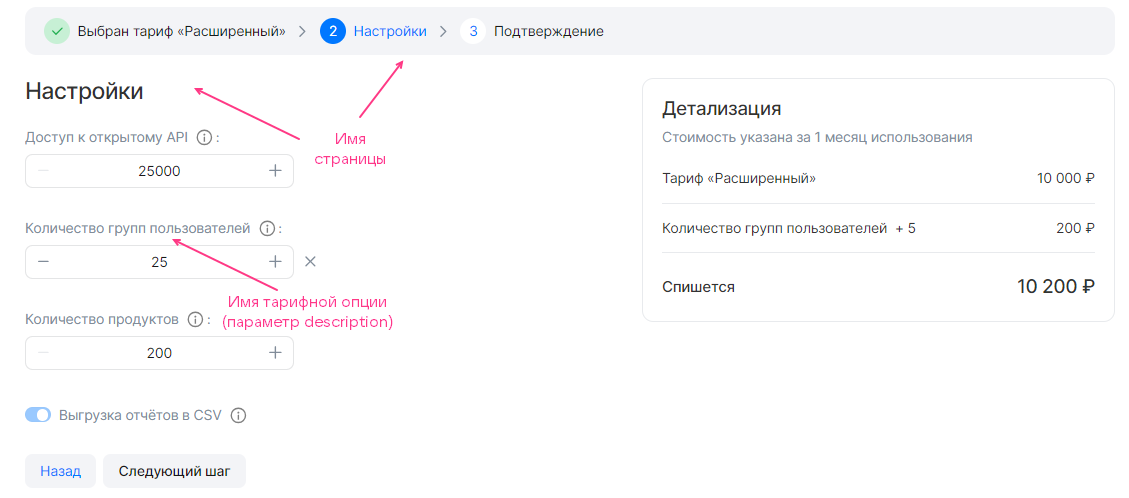
By default, all tariff option groups groups are displayed and can be configured in the tariff plan configuration wizard. To make a group appear only under certain conditions, use the when construct. The construct is described in the section Конструкция when.
{"when": {"in": { // Или "not_in""key": {"param": "<OPTION>" // Или "const": "<VALUE>"},"values": [{"const": "<VALUE>"},{"param": "<OPTION>"},...]}},"parameters": [...]}
Here:
<OPTION>— name of the tariff option in the JSON file.<VALUE>— value of the constant.
The when construct in the pages section is used in the same way as in image-based applications (for details, see the section when construct in the pages array).
{"pages": [{"name": "Настройки бекапа", // Имя страницы"groups": [{"name": "High-frequency бекап", // Имя группы тарифных опций"parameters": [{"name": "frequency_per_day" // Имя тарифной опции в JSON-файле}],"when": {"in": {"key": {"param": "backup_method" // Имя тарифной опции в JSON-файле},"values": [{"const": "high-frequency"}]}}}]}]}
In the example above, the backup creation frequency is configured for the high-frequency method: if the value of the backup_method tariff option is high-frequency, the tariff plan configuration wizard displays the High-frequency бекап group with the frequency_per_day tariff option.
The backup_method tariff option:
- Can be used in the
whenconstruct in other groups. - Must be specified in
parametersin another group.
The frequency_per_day tariff option cannot be used in other groups:
- In the
whenconstruct, because only one level of dependency hierarchy is supported. - In
parameters, because a single tariff option can be specified in only one group.
The billing section specifies:
-
The cost of a specific tariff plan.
-
The duration of the reporting period for billing.
-
The frequency with which Marketplace requests usage reports from the broker.
-
The procedure for handling unused bonuses.
-
The custom change step for tariff options of the
integertype. -
The cost of the plan's tariff options. Paid tariff options can be of the following types:
- Numeric (
integer,number). Both prepaid and postpaid billing are supported. - Boolean (
boolean). Prepaid billing is supported.
- Numeric (
For more information about billing types, see the section Billing.
The applied billing method is determined by the location where the tariff options are described in the plans.schemas section (for details, see the section schemas section):
- If the options are described in the
service_instance.createandservice_instance.updatesections, prepaid billing is applied. - If the options are described in the
service_instance.resource_usagessection, postpaid billing is applied.
Describe the billing section using the following structure:
"billing": {"cost": <COST>,"billing_cycle_flat": <PERIOD>,"billing_cycle_step": <STEP>,"refundable": <IS_REFUNDABLE>,"options": {"<OPTION>": {<OPTION_BILLING>},...}}
Here:
-
The
costparameter — defines the cost of the plan for the reporting period<COST>excluding paid tariff options. It is set in the currency of the country where the store is deployed. If the plan is free,0is specified. Only prepaid billing is supported. -
(Optional) The
billing_cycle_flatparameter — defines the duration of the reporting period for billing. It can be specified only for a prepaid tariff plan. The default value is1 mons 0 days.It is set in the format:
<NUMBER_OF_MONTHS> mons <NUMBER_OF_DAYS> days, for example:1 mons 15 days,30 days. The number of days in a monthmonsis calculated based on the calendar value, so the periods1 mons 0 daysand0 mons 31 daysare not equal to each other. -
(Optional) The
billing_cycle_stepparameter — defines the duration of the period with which the store polls the broker for unprocessed reports (for details, see the section Billing). It can be specified only for a tariff plan with postpaid tariff options. The default value is1 mons 0 days.It is set in the format:
<NUMBER_OF_MONTHS> mons <NUMBER_OF_DAYS> days, for example:1 mons 15 days,30 days. The number of days in a monthmonsis calculated based on the calendar value, so the periods1 mons 0 daysand0 mons 31 daysare not equal to each other. -
(Optional) The
refundableparameter — defines whether to refund the funds for the remaining days of the billing period to the project's bonus account if the user changed the tariff plan or deleted the service instance. It can be specified only for a prepaid tariff plan. The default value istrue.This parameter affects the date of charging the service payment when the user changes the tariff plan (edits the tariff options or switches to a new one):
- If the value is
true, the date does not change. - If the value is
false, the date is updated to the date of the tariff plan change.
- If the value is
-
(Optional) The
optionssection — describes the cost of paid tariff options.<OPTION>— name of the tariff option in the JSON file.<OPTION_BILLING>— cost of the tariff option and the change step parameters for an option of theintegertype. The tariff option itself (type, value settings) is described in the section schemas section.
The change step of an integer tariff option in <OPTION_BILLING> is described by the same parameters as for an image-based application (for details, see the section Parameters of the billing section).
To make the option free, specify 0 in the billing.options.<OPTION>.cost parameter.
"billing": {"cost": 2000, // Стоимость тарифного плана"options": {"quantity": { // Имя опции в JSON-файле"base": 25, // Стандартное значение опции"cost": 0, // Стоимость шага изменения опции"unit": {"size": 100 // Шаг изменения опции}}}}
Figures 1, 2, 3 show how the cost of the tariff plan and the option described above will be displayed in the tariff plan configuration wizard.


The cost and change step of a prepaid integer tariff option in <OPTION_BILLING> are described by the same parameters as for an image-based application (for details, see the section Parameters of the billing section).
To make the option prepaid, specify the cost per 1 change step in the billing.options.<OPTION>.cost parameter.
"billing": {"cost": 2000, // Стоимость тарифного плана"options": {"quantity": { // Имя опции в JSON-файле"base": 25, // Стандартное значение опции"cost": 150, // Стоимость шага изменения опции"unit": {"size": 100 // Шаг изменения опции}}}}
Figures 4, 5, 6 show how the cost of the tariff plan and the option described above will be displayed in the tariff plan configuration wizard.


For the boolean toggle option to be prepaid, specify the cost in the billing.options.<OPTION>.cost parameter.
"billing": {"cost": 2000, // Tariff plan cost"options": {"notifications": { // Option name in the JSON file"cost": 50 // Option cost}}}
Figure 8 shows how the tariff plan cost and the option described above will be displayed in the tariff plan configuration wizard.
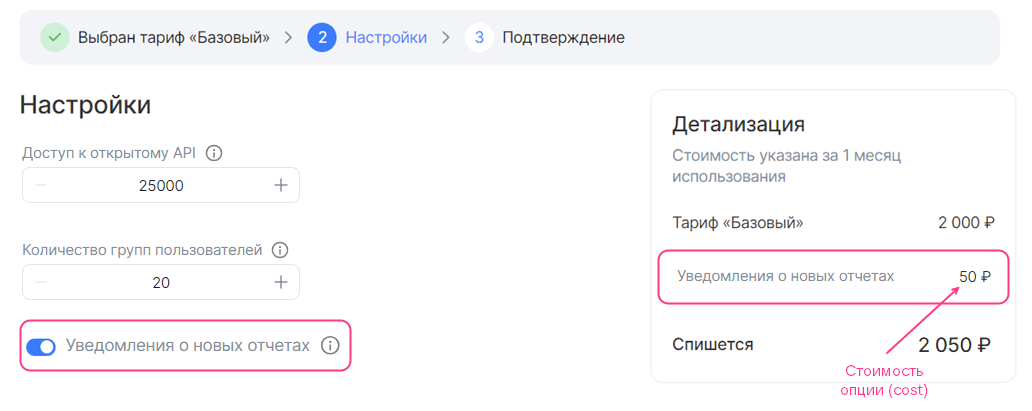
The cost of a postpaid option of the integer or number type in <OPTION_BILLING> is described by the parameters given in table 3.
Name | Description | Format | Mandatory |
|---|---|---|---|
cost | Defines the cost of a unit of the tariff option. | float64, >= 0 |
|
unit | Defines the measurement units of the option |
|
|
Parameters of the | |||
unit.size | Tariffication step of the option. The value must be | integer |
|
unit.measurement | Defines the measurement units of the option | string, up to 255 characters |
|
"billing": {"cost": 0, // Tariff plan cost"options": {"storage": { // Option name in the JSON file"cost": 7,"unit": {"size": 1,"measurement": "GB"}}}}
In the example above, the tariff plan is free, and one unit of the storage tariff option costs 7 monetary units (figure 9).

In the schemas section, describe the tariff options of a specific plan (for more details, see the section Tariff option types) using the following structure:
"schemas": {"service_instance": {"create": {"parameters": {"$schema": "http://json-schema.org/draft-04/schema#","type": "object","properties": {}}},"update": {"parameters": {"$schema": "http://json-schema.org/draft-04/schema#","type": "object","properties": {}}},"resource_usages": {"parameters": {"$schema": "http://json-schema.org/draft-04/schema#","type": "object","properties": {}}}},"service_binding": {"create": {"parameters": {"type": "object","properties": {}}}}}
Here:
-
The
service_instancesection — describes the tariff options of the plan and defines the way funds are charged for paid options.- The
service_instance.createsection — describes free and prepaid tariff options that will be active in the tariff plan configuration wizard when the service is connected. - The
service_instance.updatesection — describes free and prepaid tariff options that will be active in the tariff plan configuration wizard when the service tariff plan is updated. - The
service_instance.resource_usagessection — describes postpaid tariff options.
- The
-
The
service_bindingsection — describes the creation of service bindings.
All sections inside schemas are mandatory to declare in the JSON file. The sections can be empty.
The parameters of tariff options are described by JSON schemas. The cost of paid options, as well as the increment step for an option of the integer type, is described in the plans.billing.options section (for more details, see the section The billing section).
For a SaaS application, all types of tariff options are supported except datasource (for more details, see the section Tariff option types). Tariff options are described by the same parameters as for an image-based application (for more details, see the section Parameters of the schema section). The cost of an option is described in the section The billing section.
Filling in the schema section with examples of how different types of options are displayed in the store interface is described in the section Filling in YAML files of tariff options.
Examples of describing different types of options in JSON format are given below.
"schemas": {"service_instance": {"create": {"parameters": {"$schema": "http://json-schema.org/draft-04/schema#","type": "object","properties": {"int_const": { // Constant tariff option of the integer type"type": "integer","description": "System disk size","hint": "In GB","const": 20},"int_enum": { // Tariff option of the integer type with value selection from a list"type": "integer","description": "Number of servers in the cluster","enum": [3, 5, 7],"default": 5},"int_step_1": { // Tariff option of the integer type with an increment step of 1"type": "integer","description": "Number of participants","hint": "Number of the customer's employees who can use the testing infrastructure and process reports from VK Testers testers.","default": 20,"minimum": 20},"int_step_user": { // Tariff option of the integer type with a custom increment step. Step parameters are described in the billing section"type": "integer","description": "Volume of uploaded builds","hint": "Test builds of applications can be uploaded to the platform for distribution to the customer's employees and VK Testers testers. The larger the storage, the more versions of your products can be stored on the testing platform. Supported platforms: iOS, Android, Windows, MacOS, Linux.","default": 0},"string_const": { // Constant tariff option of the string type"type": "string","description": "Administrator login","const": "admin@example.ru"},"string_input": { // Tariff option of the string type with value input"type": "string","description": "Administrator email","hint": "Email for issuing an SSL certificate"},"string_enum": { // Tariff option of the string type with value selection from a list"type": "string","description": "OS type","hint": "Operating system","enum": ["Ubuntu 20.4", "Windows 8.1", "Windows 10"],"default": "Windows 8.1"},"boolean_const": { // Constant tariff option of the boolean type"type": "boolean","description": "Premium support","hint": "24/7 technical support","const": false},"boolean": { // Toggle tariff option of the boolean type"type": "boolean","description": "Update notifications","hint": "Whether to receive email notifications about new service versions.","default": true}}}},"update": {"parameters": {"$schema": "http://json-schema.org/draft-04/schema#","type": "object","properties": {}}},"resource_usages": {"parameters": {"$schema": "http://json-schema.org/draft-04/schema#","type": "object","properties": {}}}},"service_binding": {"create": {"parameters": {"type": "object","properties": {}}}}}
"schemas": {"service_instance": {"create": {"parameters": {"$schema": "http://json-schema.org/draft-04/schema#","type": "object","properties": {}}},"update": {"parameters": {"$schema": "http://json-schema.org/draft-04/schema#","type": "object","properties": {}}},"resource_usages": {"parameters": {"$schema": "http://json-schema.org/draft-04/schema#","type": "object","properties": {"storage": {"description": "Storage at the Cyberprotect data center for Cloud Backup products","type": "number"}}}}},"service_binding": {"create": {"parameters": {"type": "object","properties": {}}}}}