display.yaml fileBeta
The display.yaml configuration file describes how the tariff plan will be displayed in the tariff plan matrix of your application.
Main sections of the file:
Name | Description | Format | Required |
|---|---|---|---|
| Describes all pages of the tariff plan configuration wizard, except the first and last ones. If the parameter is not specified, the configuration wizard will consist only of automatically generated pages | Array |
|
| Describes the billable VK Cloud infrastructure items:
The cost of these items will be displayed in the tariff plan configuration wizard. It is calculated automatically in accordance with VK Cloud tariffs | Array |
|


The array describes the pages of the configuration wizard for the tariff plan. Each page displays one or more groups of tariff options. The maximum number of pages is 5.
Parameters of the pages array:
Name | Description | Format | Required |
|---|---|---|---|
| Name of the configuration wizard page, no more than 32 characters |
|
|
| Groups of tariff options displayed on a specific page of the configuration wizard | Array |
|
| Name of the tariff option group, no more than 255 characters |
|
|
| List of names of the tariff options included in the group. | List, list item — |
|
| Name of the tariff option, matching the name of the YAML file of this option: |
|
|

By default, the tariff plan configuration wizard displays all groups of tariff options (groups) specified in the pages array. The when construct is used to show or hide groups depending on specified conditions.
Below is an example of how the tariff plan configuration wizard from this example will be displayed.

The array describes the elements of the VK Cloud infrastructure that will be billed under the tariff plan.
By default, the tariff plan configuration wizard displays the cost of all infrastructure elements described in the entities array. The when construct is used to show or hide the infrastructure cost depending on specified conditions.
General parameters of the entities array:
Name | Description | Format | Required |
|---|---|---|---|
| Type of infrastructure element:
|
|
|
| Description of the infrastructure element |
|
|

Example of describing the Service settings page in the tariff plan configuration wizard:
pages:- name: Service settings # Page namegroups:- name: Server # Tariff option group nameparameters:- name: network # Tariff option name- name: vm- name: az- name: System diskparameters:- name: volume_size- name: volume_type
Parameters of the entities array for a VM:
Name | Description | Format | Required |
|---|---|---|---|
| Number of VMs, specified by the | Section |
|
| Number of VMs |
| — |
| Name of the tariff option ( |
| — |
| VM type, specified by the | Section |
|
|
| — | |
| Name of the tariff option ( |
| — |
| VM disks. Each disk is described by the | Array |
|
| Disk type, specified by the | Section | — |
| Disk type. Possible values:
|
| — |
| Name of the tariff option ( |
| — |
| Disk size, specified by the | Section | — |
| Disk size |
| — |
| Name of the tariff option ( |
| — |
Example of describing a VM for the tariff plan configuration wizard:
entities:- entity: vmdescription: Virtual machinecount:const: 1flavor:param: ds-flavor # Tariff option namedisks:- type:param: root_typesize:param: root_size- type:param: data_typesize:param: data_size
Below is an example of how the infrastructure cost information from this example will be displayed in the tariff plan configuration wizard.

Parameters of the entities array for a load balancer:
Name | Description | Format | Required |
|---|---|---|---|
| Number of load balancers, specified by the | Section |
|
| Number of load balancers |
| — |
| Name of the tariff option ( |
| — |
Example of describing a load balancer for the tariff plan configuration wizard:
entities:- entity: load_balancingcount:param: number_balancing # Tariff option name
Parameters of the entities array for an external IP address:
Name | Description | Format | Required |
|---|---|---|---|
| Number of external IP addresses, specified by the | Section |
|
| Number of external IP addresses |
| — |
| Name of the tariff option ( |
| — |
Example of describing an external IP address for the tariff plan configuration wizard:
entities:- entity: floating_ipcount:const: 1
The when construct controls conditional branching when displaying the tariff plan wizard. It contains:
-
Condition type:
when.in— checks equality of the values specified by thekeyandvaluesparameters. The condition is met if the value ofkeyis equal to at least one of thevalues.when.not_in— checks inequality of the values specified by thekeyandvaluesparameters. The condition is met if the value ofkeyis not equal to any of thevalues.
-
Criteria. Specified by the
keyandvaluesparameters in one of the following ways:- Via the
paramparameter — to use the value of a specific tariff option. - Via the
constparameter — to use a fixed value.
keycan be set to one value,values— to one or more. - Via the
Structure of when in YAML format:
when:in: # or not_inkey:param: <OPTION_NAME> # or const: <VALUE>values:- const: <VALUE>- param: <OPTION_NAME>...
Here:
<OPTION_NAME>— the name of the tariff option, matching the name of the YAML file of this option.<VALUE>— a fixed value.
In the pages array, the when construct is used to set a condition that determines whether a group of tariff options should be displayed in the tariff plan configuration wizard.
The same tariff option can be used in when constructs in different groups. Depending on the value of the tariff option, different groups will be displayed in the configuration wizard.
When using the when construct, a page with groups of tariff options will be hidden if the following conditions are met at the same time:
- All groups on the same page have a
whenconstruct. - The tariff plan configuration wizard has tariff option values set such that the conditions in all groups on this page are not met.
Example of using the when construct in the pages array:
pages:- name: Backup settings # Page namegroups:- name: High-frequency backup # Tariff option group nameparameters:- name: frequency_per_day # Tariff option namewhen:in:key:param: backup_method # Tariff option namevalues:- const: high-frequency
In this example, the High-frequency backup group with the frequency_per_day tariff option will be displayed if the user selected the value high-frequency for the backup_method tariff option in the configuration wizard. The user will then be able to choose the backup frequency.
The backup_method tariff option:
- can be used in a
whenconstruct in other groups; - must be specified in the
parametersarray in another group.
The frequency_per_day tariff option cannot be used in other groups:
- in a
whenconstruct — because only one level of condition hierarchy is supported; - in
parameters— because a single tariff option can be specified in only one group.
In the entities array, the when construct is used to set a condition that determines whether the cost of the infrastructure element described in the entities array should be displayed in the tariff plan configuration wizard.
Example of using the when construct in the entities array:
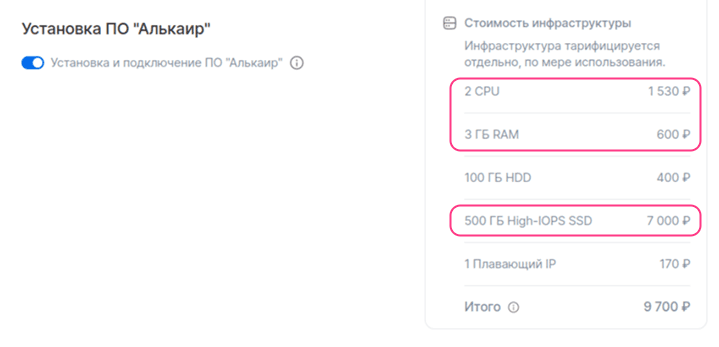
entities:- entity: vmdescription: alkair_softwarewhen:in:key:param: need_install_alkair_software # Tariff option namevalues:- const: trueflavor:const: 6a7a0690-943a-4921-936e-2849970ccfba # VM type (CPU, RAM). In this example, a VM with 2 CPU and 3 GB RAMcount:const: 1disks:- type:const: high-iops # Disk typesize:const: 500 # Disk size
This example shows a configuration for displaying the cost of a VM for the Alkair software. If the user selects the value true for the need_install_alkair_software tariff option, the cost of the VM described in the entities.entity element will be displayed in the tariff plan configuration wizard.