
display sectionBeta
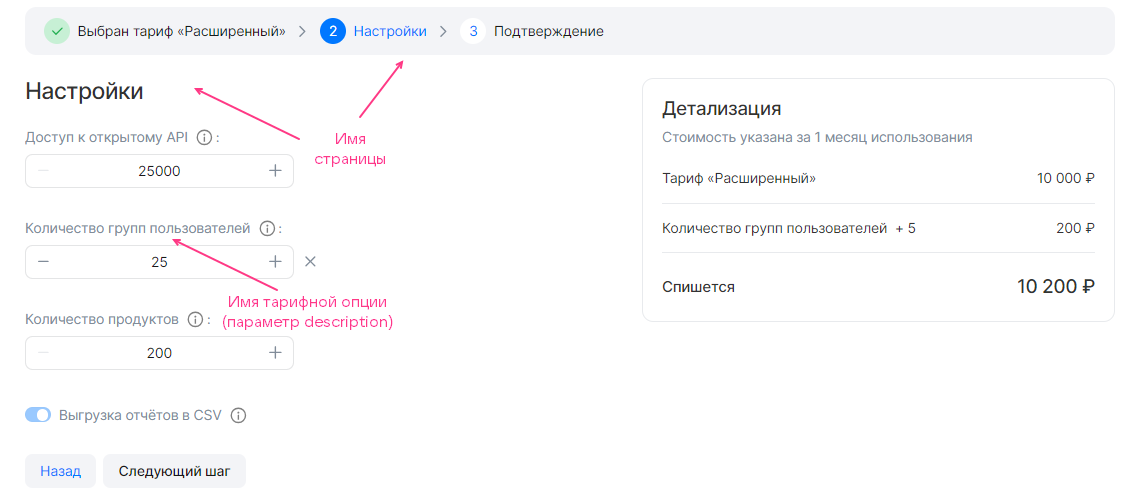
The display section in the service configuration JSON file describes the tariff plan configuration wizard. The section has the following structure:
"display": {"pages": [{<PAGE_PARAMETERS>,"groups": [{<GROUP_PARAMETERS>,"parameters": [{<OPTION_PARAMETERS>},...]}...]},...]}
Here:
-
pages— a section describing the pages of the tariff plan configuration wizard. It can be empty. -
<PAGE_PARAMETERS>— parameters of a single page. -
groups— a section describing groups of tariff options within a single page. -
<GROUP_PARAMETERS>— parameters of a group of tariff options. -
parameters— a section describing tariff options within a single group. -
<OPTION_PARAMETERS>— parameters of tariff options.
The display section describes all pages of the tariff plan configuration wizard except the first and the last ones. The maximum number of pages is 5.
The parameters of pages, groups, and tariff options within groups are identical and are given in the table.
Name | Description | Format | Required |
|---|---|---|---|
| The name of a page, group, or tariff option in the JSON file. | string. Page name — up to 32 characters. Group name — up to 255 characters |
|
| The sequential number of a page, a group on the page, or a tariff option in the group | integer |
|


By default, all groups of tariff options groups are displayed and configured in the tariff plan configuration wizard. To make a group display only under certain conditions, use the when construct.
The structure of when in JSON format:
{"when": {"in": { // Or "not_in""key": {"param": "<OPTION_NAME>" // Or "const": "<VALUE>"},"values": [{"const": "<VALUE>"},{"param": "<OPTION_NAME>"},...]}},"parameters": [...]}
Here:
<OPTION_NAME>— the name of the tariff option in the service configuration JSON file.<VALUE>— the value of the constant.
The when construct in the pages section is used in the same way as in image-based applications.