
Tariff option examplesBeta

actions:- create- updateschema:description: System disk sizehint: In GBtype: integerconst: 20
Here:
-
actions— an array of two values,createandupdate. It allows the user to select the tariff option both when connecting the service and when updating the tariff plan. -
schema— a sequence of values:description— the name of the tariff option.hint— the description of the tariff option (optional).type— the type of the tariff option. Specifyinteger.const— the value of the tariff option.

actions:- create- updateschema:description: Number of servers in the clustertype: integerenum: [3, 5, 7]default: 5
Here:
-
actions— an array of two values,createandupdate. It allows the user to select the tariff option both when connecting the service and when updating the tariff plan. -
schema— a sequence of values:description— the name of the tariff option.hint— the description of the tariff option (optional).type— the type of the tariff option. Specifyinteger.enum— the possible values of the tariff option.default— the default value.
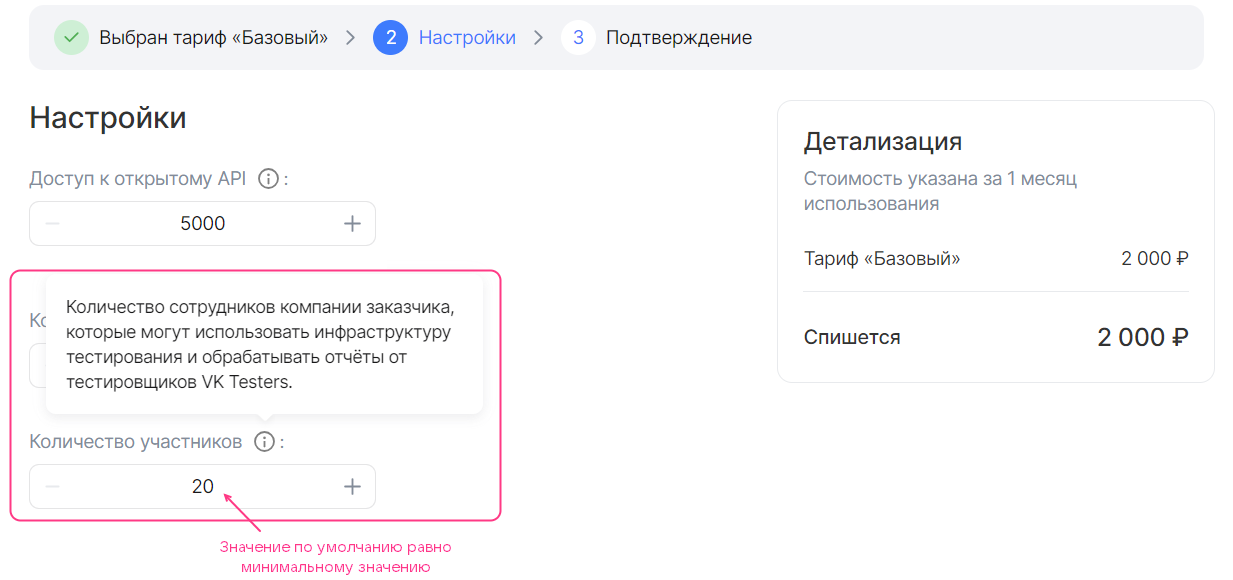
Before changing the value:
After increasing the value by 1 point:
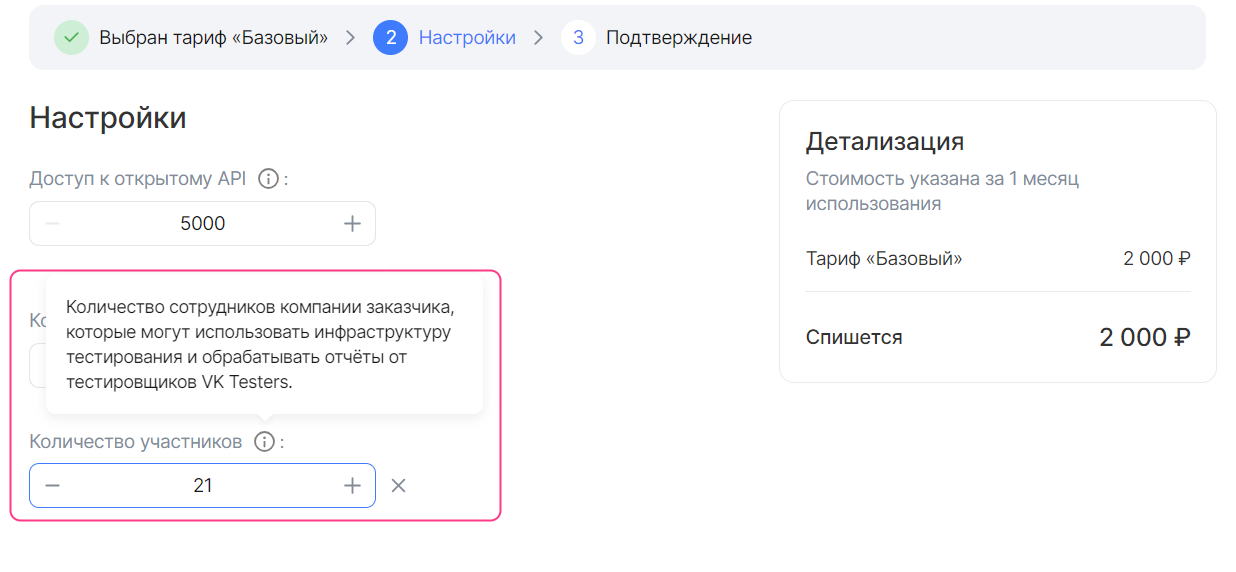
actions:- create- updateschema:description: Number of participantshint: The number of the customer's company employees who can use the testing infrastructure and process reports from VK Testers testers.type: integerdefault: 20minimum: 20
Here:
-
actions— an array of two values,createandupdate. It allows the user to select the tariff option both when connecting the service and when updating the tariff plan. -
schema— a sequence of values:description— the name of the tariff option.hint— the description of the tariff option (optional).type— the type of the tariff option. Specifyinteger.default— the default value (optional).
If the parameter is not set, the default value will be
0.minimumandmaximum— the maximum and minimum values of the tariff option (optional).
actions:- create- updatebilling:base: 25cost: 0unit:size: 100schema:description: Volume of uploaded buildshint: Test builds of applications can be uploaded to the platform to distribute them to the customer's employees and VK Testers testers. The larger the storage, the more versions of your products can be saved on the testing platform. Supported platforms: iOS, Android, Windows, MacOS, Linux.type: integerdefault: 0
Here:
-
actions— an array of two values,createandupdate. It allows the user to select the tariff option both when connecting the service and when updating the tariff plan. -
billing— a sequence of values:base— the standard value.cost— the cost of the increment step. Specify0.unit.size— the size of the increment step.unit.measurement— the units of measurement of the tariff option (optional).
-
schema— a sequence of values:-
description— the name of the tariff option. -
hint— the description of the tariff option (optional). -
type— the type of the tariff option. Specifyinteger. -
default— the default value (optional). It is set relative to the standard value of the option:-
Do not specify the
defaultparameter or specify0so that the default value equals the standard value. -
Specify an integer value
nso that the default value is calculated using the formula based on the standard value and the entered valuen:billing.base + n * billing.unit.size
-
-
minimumandmaximum— the maximum and minimum values of the tariff option (optional). They are set in the same way as it was done for the default value.
-
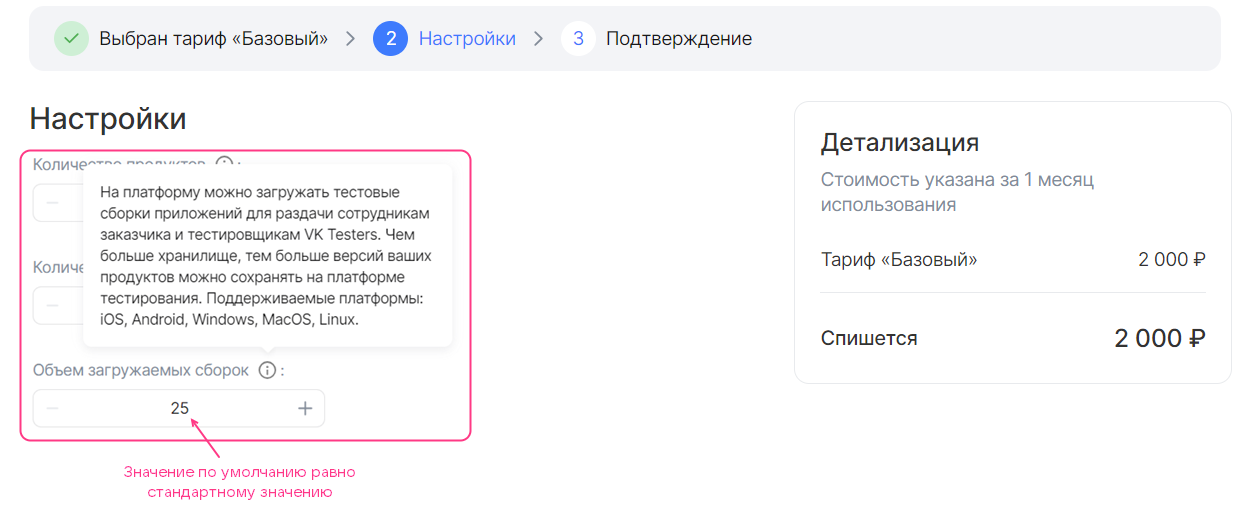
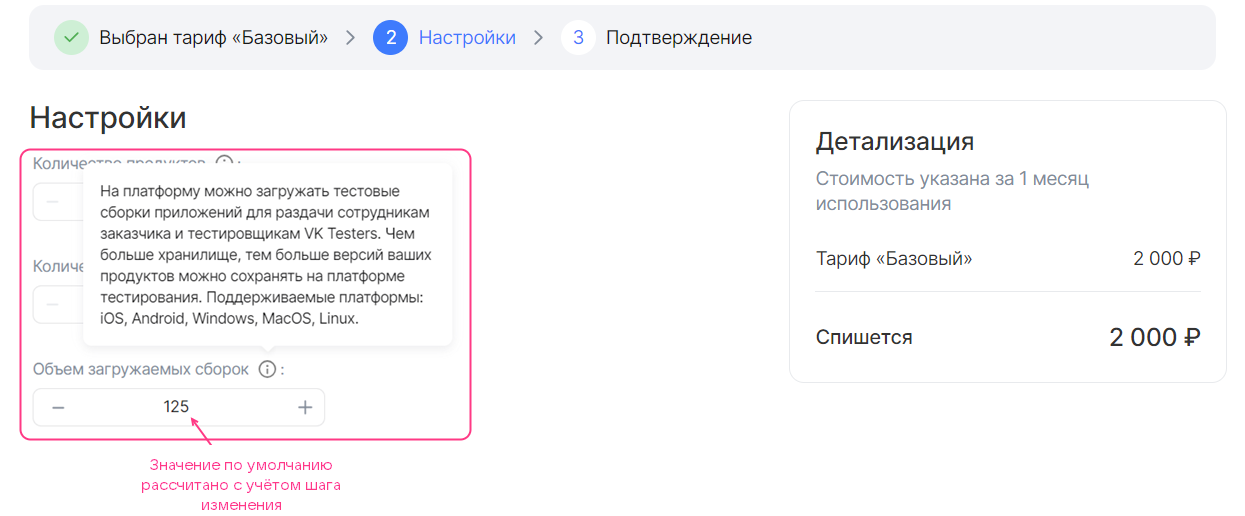
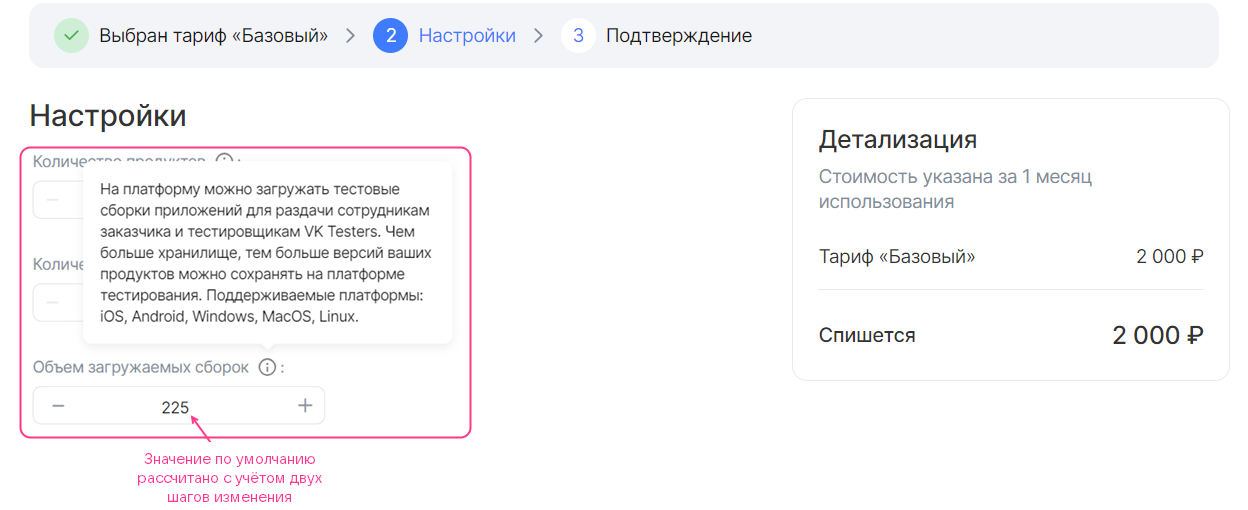
Below is shown how the choice of the default parameter affects the display of the option in the tariff plan configuration wizard.
Free tariff option of the integer type with a custom increment step (billing.base = 25, schema.default = 0, billing.unit.size = 100):
Free tariff option of the integer type with a custom increment step (billing.base = 25, schema.default = 1, billing.unit.size = 100):
Free tariff option of the integer type with a custom increment step (billing.base = 25, schema.default = 2, billing.unit.size = 100):

actions:- create- updateschema:description: Administrator logintype: stringconst: admin@example.ru
Here:
-
actions— an array of two values,createandupdate. It allows the user to select the tariff option both when connecting the service and when updating the tariff plan. -
schema— a sequence of values:description— the name of the tariff option.hint— the description of the tariff option (optional).type— the type of the tariff option. Specifystring.const— the value of the tariff option.

actions:- create- updateschema:description: Administrator emailhint: Email for issuing an SSL certificatetype: string
Here:
-
actions— an array of two values,createandupdate. It allows the user to select the tariff option both when connecting the service and when updating the tariff plan. -
schema— a sequence of values:description— the name of the tariff option.hint— the description of the tariff option (optional).type— the type of the tariff option. Specifystring.default— the default value.- Additional parameters given in the reference (optional).

actions:- create- updateschema:description: OS typehint: Operating systemtype: stringenum: ["Ubuntu 20.4", "Windows 8.1", "Windows 10"]default: Windows 8.1
Here:
-
actions— an array of two values,createandupdate. It allows the user to select the tariff option both when connecting the service and when updating the tariff plan. -
schema— a sequence of values:description— the name of the tariff option.hint— the description of the tariff option (optional).type— the type of the tariff option. Specifystring.enum— the possible values of the tariff option.default— the default value.
Below is shown how the option from this example will be displayed in the tariff plan configuration wizard.

actions:- create- updateschema:description: Premium supporthint: 24/7 technical supporttype: booleanconst: false
Here:
-
actions— an array of two values,createandupdate. It allows the user to select the tariff option both when connecting the service and when updating the tariff plan. -
schema— a sequence of values:description— the name of the tariff option.hint— the description of the tariff option (optional).type— the type of the tariff option. Specifyboolean.const— the value of the tariff option.

actions:- create- updateschema:description: Update notificationshint: Whether to receive email notifications about new versions of the service.type: booleandefault: true
Here:
-
actions— an array of two values,createandupdate. It allows the user to select the tariff option both when connecting the service and when updating the tariff plan. -
schema— a sequence of values:description— the name of the tariff option.hint— the description of the tariff option (optional).type— the type of the tariff option. Specifyboolean.default— the default value (optional).
If the
defaultparameter is not set, the default value will befalse.
Below is shown how the option from this example will be displayed in the tariff plan configuration wizard.
Here:
-
actions— an array of two values,createandupdate. It allows the user to select the tariff option both when connecting the service and when updating the tariff plan. -
billing— a sequence of values:base— the standard value. The standard value is included in the cost of the tariff plan.cost— the cost of the increment step.unit.size— the size of the increment step.unit.measurement— the units of measurement of the tariff option (optional).
Example of filling in the
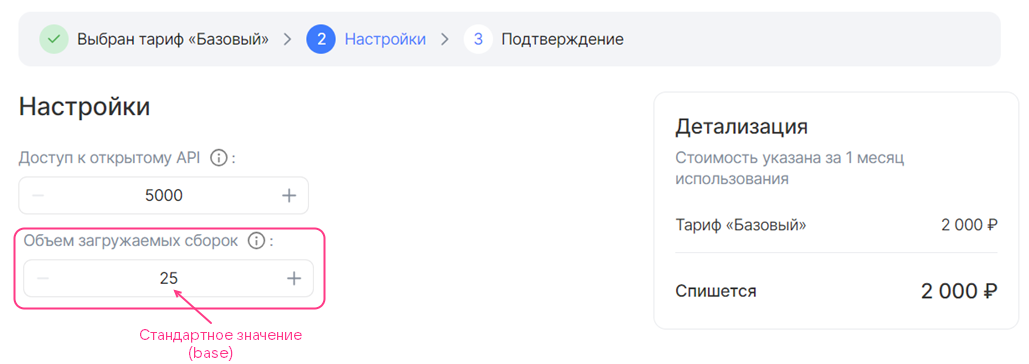
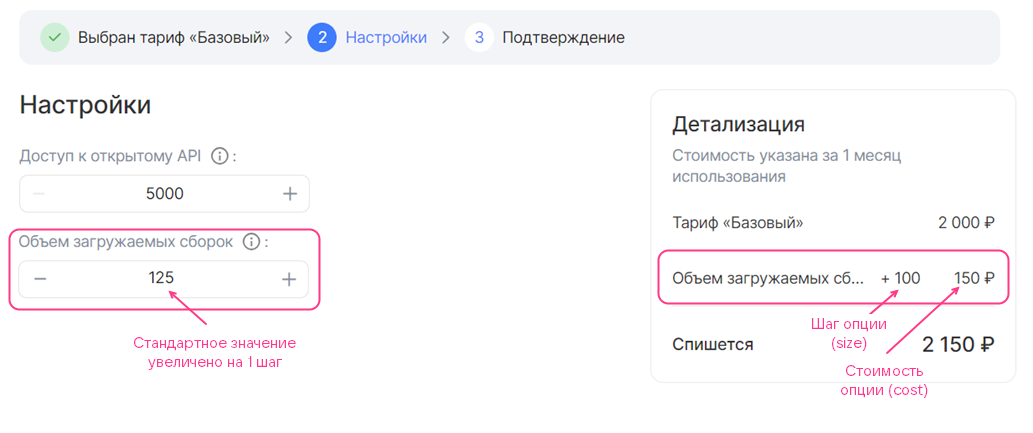
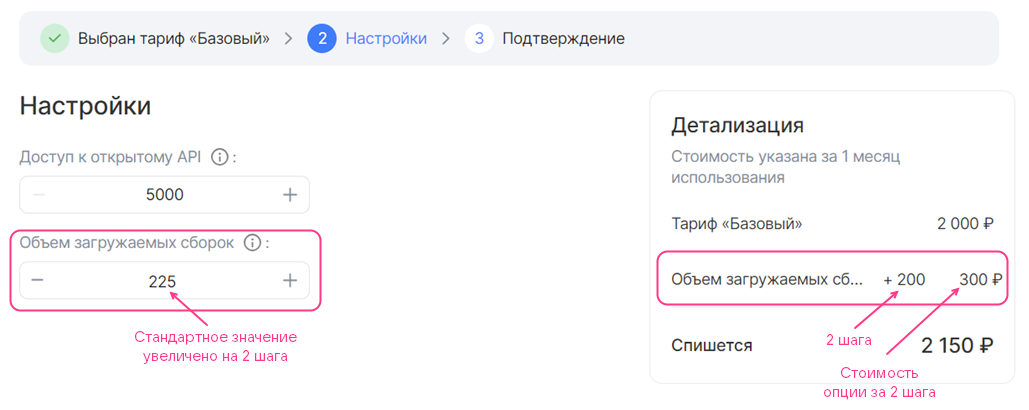
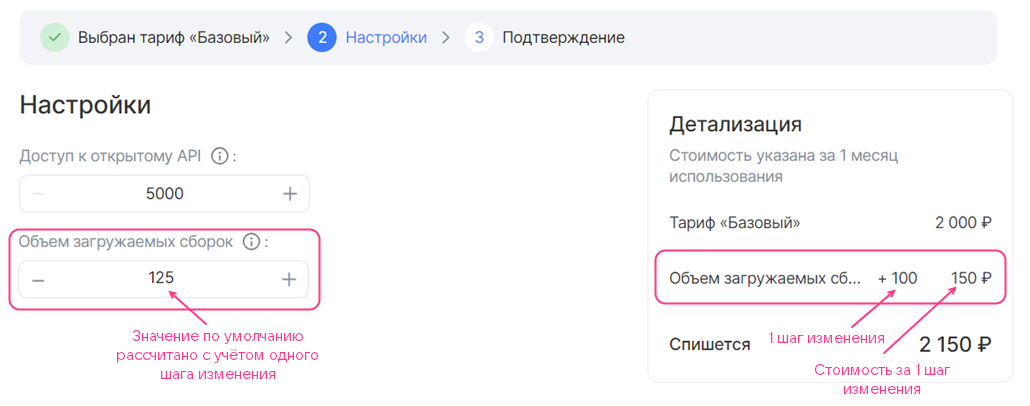
billingsection:billing:base: 25cost: 150unit:size: 100In this example, every 100 units of the option, in addition to the standard value, cost 150 monetary units. Below is shown how this option will be displayed in the tariff plan configuration wizard as the user increases the value.
Paid tariff option of the integer type with an increment step (billing.base = 25, billing.cost = 150, billing.unit.size = 100):
Paid tariff option of the integer type with an increment step, the value increased by 1 step (billing.base = 25, billing.cost = 150, billing.unit.size = 100):
Paid tariff option of the integer type with an increment step, the value increased by 2 steps (billing.base = 25, billing.cost = 150, billing.unit.size = 100):
-
Fill in the
schemasection in the same way as for a free tariff option with a custom increment step.If the default value of the tariff option is not equal to the standard value (
schema.default ≠ 0), then when the user opens the tariff plan configuration wizard, its cost will be displayed for such a tariff option (see the figure below). The user can reduce the value of the option to the standard one, which is included in the cost of the tariff plan.Paid tariff option of the integer type with an increment step (billing.base = 25, billing.cost = 150, billing.unit.size = 100, schema.default = 1):

actions:- create- updateschema:description: Notifications about new reportshint: Whether to receive email notifications about new reportstype: booleandefault: truebilling:cost: 50
Here:
-
actions— an array of two values,createandupdate. It allows the user to select the tariff option both when connecting the service and when updating the tariff plan. -
schema— a sequence of values:description— the name of the tariff option.hint— the description of the tariff option (optional).type— the type of the tariff option. Specifyboolean.default— the default value (optional).
If the
defaultparameter is not set, the default value will befalse. -
billing— a sequence of one value of the integer type,cost— the cost of the option when the switch is in the active position.

actions:- resource_usagesbilling:cost: 7unit:size: 1measurement: GBschema:description: Storage in the Cyberprotect data center for Cloud Backup productstype: number
Here:
-
actions— an array of one value,resource_usages. -
billing— a sequence of values:cost— the cost of a unit of the tariff option.unit.size— the billing step. Specify1.unit.measurement— the units of measurement of the tariff option (optional).
-
schema— a sequence of values:description— the name of the tariff option.hint— the description of the tariff option (optional).type— the type of the tariff option. Specifyintegerornumber.

actions:- create- updateschema:description: Virtual machine typetype: stringdatasource:type: flavor
Here:
-
actions— an array of two values,createandupdate. It allows the user to select the tariff option both when connecting the service and when updating the tariff plan. -
schema— a sequence of values:description— the name of the tariff option.hint— the description of the tariff option (optional).type— the type of the tariff option. Specifystring.datasource.type— the type of the cloud platform entity. Specifyflavor.datasource.filter— filters (optional). The possible filters are given in the reference.
Below is shown how the option from this example will be displayed in the tariff plan configuration wizard.

actions:- create- updateschema:description: Availability zonetype: stringdefault: gz1datasource:type: az
Here:
-
actions— an array of two values,createandupdate. It allows the user to select the tariff option both when connecting the service and when updating the tariff plan. -
schema— a sequence of values:description— the name of the tariff option.hint— the description of the tariff option (optional).type— the type of the tariff option. Specifystring.default— the default value (optional). The possible values are given in the reference.datasource.type— the type of the cloud platform entity. Specifyaz.
Below is shown how the option from this example will be displayed in the tariff plan configuration wizard.
actions:- create- updateschema:description: Networktype: stringdatasource:type: subnet
Here:
-
actions— an array of two values,createandupdate. It allows the user to select the tariff option both when connecting the service and when updating the tariff plan. -
schema— a sequence of values:description— the name of the tariff option.hint— the description of the tariff option (optional).type— the type of the tariff option. Specifystring.datasource.type— the type of the cloud platform entity. Specifysubnet.
Below is shown how the option from this example will be displayed in the tariff plan configuration wizard.


actions:- create- updateschema:description: Private networkhint: Private networktype: stringdatasource:type: networkvalue_is: namefilter:kind: privateshared: false
Here:
-
actions— an array of two values,createandupdate. It allows the user to select the tariff option both when connecting the service and when updating the tariff plan. -
schema— a sequence of values:description— the name of the tariff option.hint— the description of the tariff option (optional).type— the type of the tariff option. Specifystring.datasource.type— the type of the cloud platform entity. Specifynetwork.datasource.value_is— the type of information output. The available values are:uuid— display the network UUID.name— display the network name.datasource.filter— filters (optional). The possible filters are given in the reference.
Below is shown how the option from this example will be displayed in the tariff plan configuration wizard.

A disk is described by two tariff options (two separate YAML files):
- Disk type — using a tariff option of the
datasourcetype. - Disk size — using a tariff option of the
integertype with a change step of 1.
To describe a disk:
-
Describe a tariff option of the
datasourcetype that receives data about disk types from the cloud platform, in the fileparameters/<OPTION_NAME>.yaml:- Specify the
actionsparameter. - In the
schemasection, set the following parameters:
-
description— the name of the tariff option. -
hint— the description of the tariff option (optional). -
type— the type of the tariff option. Specifystring. -
default— the default value (optional). Possible values are given in the reference. -
tag— a tag. The tag links the option describing the disk type with the option describing the disk size. -
datasource.type— the type of the cloud platform entity. Specifyvolume_type. -
datasource.filter— filters (optional). Possible filters are given in the reference.If no filters are specified, all disk types supported by the cloud platform will be displayed.
Example of a
datasourceoption description for a disk type,YAMLformat:actions:- create- updateschema:description: Disk typetype: stringdefault: ceph-ssdtag: disk1datasource:type: volume_typefilter:disk_class:enum: ["ssd", "hdd"] - Specify the
-
In a separate file
parameters/<OPTION_NAME>.yaml, describe the disk size using a tariff option of theintegertype with a change step of 1:- Specify the
actionsparameter. - In the
schemasection, set the following parameters:
description— the name of the tariff option.hint— the description of the tariff option (optional).type— the type of the tariff option. Specifyinteger.default— the default value (optional).maximumandminimum— the maximum and minimum values (optional).tag— a tag. The value must be the same as in the file describing the disk type.
Example of a disk size description via a tariff option of the
integertype with a change step of 1,YAMLformat:actions:- create- updateschema:description: Disk sizetype: integerdefault: 100minimum: 100tag: disk1 - Specify the