
plan.yaml File
The plans/<PLAN_NAME>/plan.yaml file describes the parameters of a specific tariff plan. After the service package is uploaded and the service is published, the tariff plan will become available in the public store namespaces (namespace_public) specified in the service key (for more information, see the section Uploading an image-based application to the store).
In the plans/<PLAN_NAME>/plan.yaml file, specify the parameters and sections given in table 1.
Name | Description | Format | Required |
|---|---|---|---|
id | UUID4 tariff plan identifier (ID) generated using a UUID4 generator | string (UUID4) |
|
revision | Revision of the tariff plan. The combination of the revision and the tariff plan ID determines its uniqueness within the service. The remaining parameters describe the characteristics of a specific tariff plan revision | string, up to 255 characters |
|
name | Technical name of the tariff plan, which is not displayed in the store interface. It must be specified in Latin letters using an underscore instead of spaces | string, up to 255 characters |
|
description | Name of the tariff plan that is displayed in the store interface | string, up to 255 characters |
|
free | Defines whether this tariff plan is free or not | boolean |
|
billing | Defines the cost of the tariff plan excluding paid tariff options (for more information, see the section billing section of a tariff plan) |
|
|
parameters_patch | Allows overriding the parameters of tariff options for a specific plan (for more information, see the section parameters_patch section) |
|
|
resource_usages | Contains a list of postpaid tariff options | Array | Yes — for a plan with postpaid options |


Examples of plans/<PLAN_NAME>/plan.yaml files are provided in the section Examples of plan.yaml files.
For the tariff plan cost, only the prepaid billing type is supported (for more information, see the section Billing).
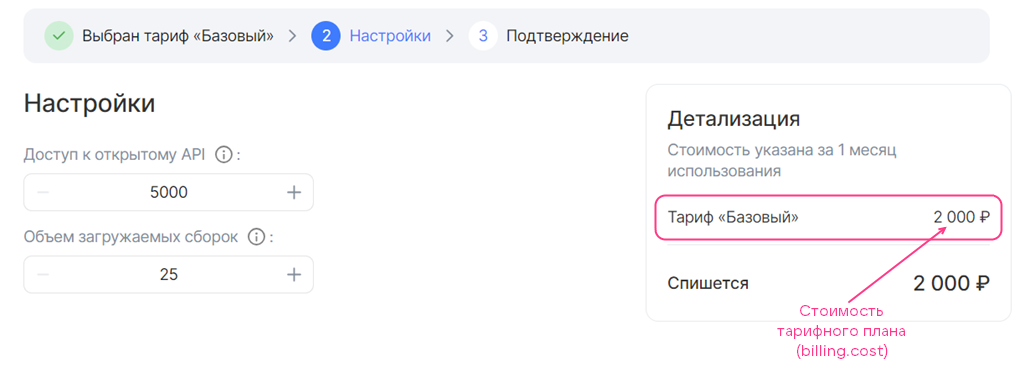
To describe the cost of a tariff plan (figure 1), specify the billing section in the plans/<PLAN_NAME>/plan.yaml file and set the parameters given in table 2.
Name | Description | Format | Required | Default value |
|---|---|---|---|---|
cost | Defines the cost of the tariff plan for a billing period excluding paid tariff options. If the plan is free, specify | float |
| — |
refundable | Defines whether or not to refund funds for the remaining days of the billing period to the project bonus account if the user changed the tariff plan or deleted the service instance. This parameter affects the date when the service payment is charged if the user changes the tariff plan (edits tariff options or switches to a new one):
| boolean |
|
|
billing_cycle_flat | Defines the duration of the billing period for billing. Format: | string |
|
|
billing:cost: 2000refundable: truebilling_cycle_flat: 1 mons 0 days
Paid tariff options can be added to the plan cost. To do this, describe their cost in YAML files (for more information, see the section Filling in YAML files of tariff options).
To override the parameters of tariff options for a specific tariff plan or add new ones not specified in the YAML files:
-
In the
plans/<PLAN_NAME>/plan.yamlfile, specify:- The
parameters_patchsection. - Inside
parameters_patch— the names of the YAML files of the tariff options.
- The
-
Set the values of the tariff option parameters. Specify the parameter names with the path to the root section. Separate the parameter name and the names of its parent sections with a dot.
The possible parameters depending on the tariff option type are given in the section Tariff option YAML file.
Example of overriding tariff option parametersparameters_patch:users:schema.const: 5000volume_data_size:schema.default: 550schema.minimum: 550The parameter values specified in the tariff option YAML file will not be applied in the tariff plan.
To override a tariff option section completely:
-
In the
plans/<PLAN_NAME>/plan.yamlfile, specify:- The
parameters_patchsection. - Inside
parameters_patch— a tariff option section. For example,billing.
- The
-
Set the section parameters (for more information, see the section Tariff option YAML file).
Example of overriding the `billing` section of a tariff optionparameters_patch:assemblies_size:billing:base: 25cost: 0unit:size: 100The parameters specified for this section in the tariff option YAML file will not be applied in the tariff plan.
id: b2b42648-XXXX-b4cddbf010b2revision: v. 1.0name: basicdescription: Basicfree: falsebilling:cost: 2000refundable: truebilling_cycle_flat: 1 monsparameters_patch:users:schema.const: 5000volume_data_size:schema.default: 550schema.minimum: 550
id: 3aa541d8-XXXX-6dbf542b3f90revision: v. 1.1name: postpaiddescription: Postpaidfree: truebilling:cost: 0resource_usages:- storage