
Broker for a SaaS application
The Store interacts with the service via a broker.
Develop a broker for a SaaS application using the VK OSB protocol. To obtain the VK OSB protocol, send an email to marketplace@cloud.vk.com. The broker must implement methods describing the lifecycle of service instances (figure 1).
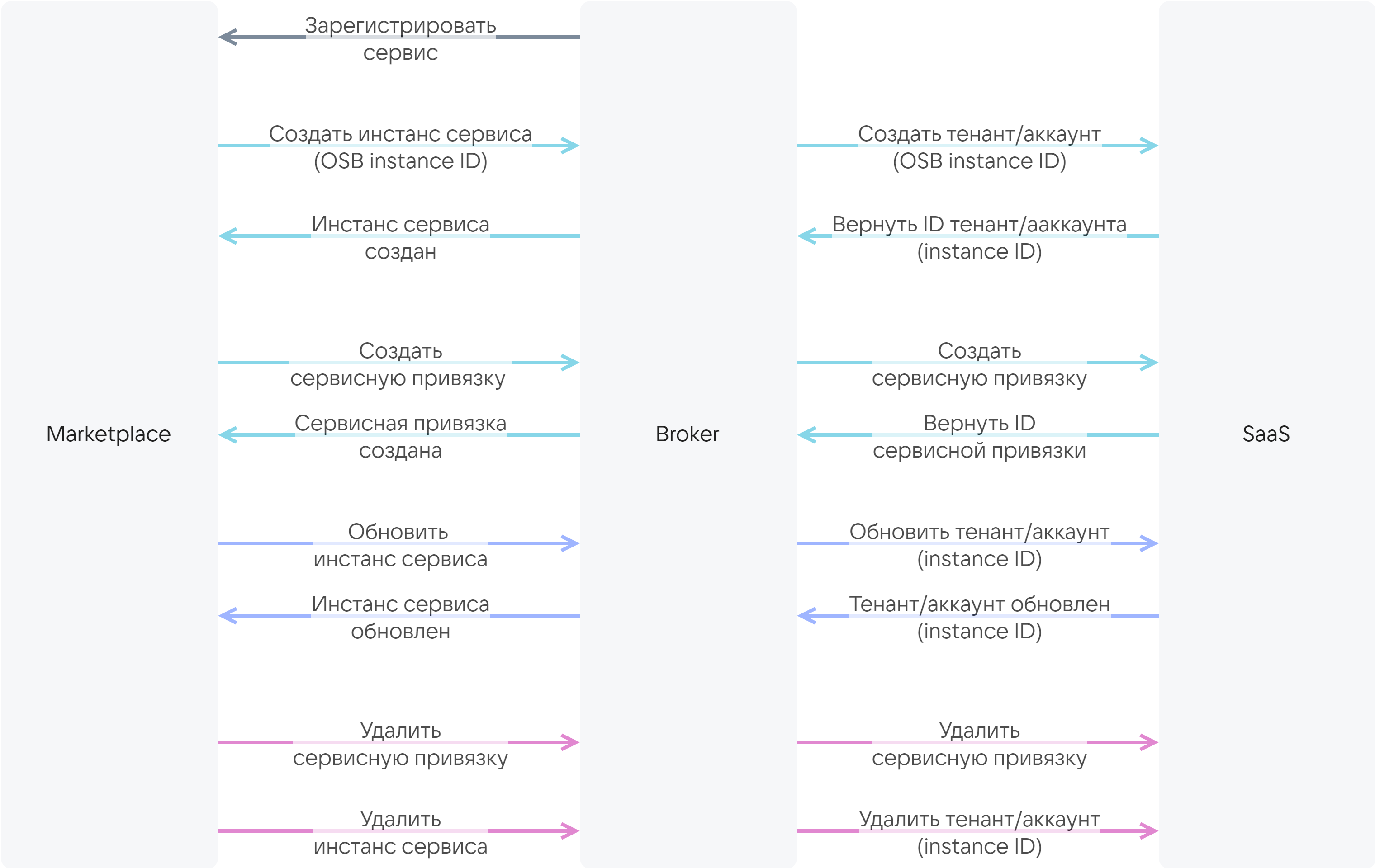
The broker must have basic authentication configured over the secure HTTPS protocol with a certificate issued by a trusted certificate authority.
The broker can be developed based on a template that already implements the interaction between the Store and the broker. The template must be supplemented with a description of the broker's interaction with a specific SaaS application.
To develop a broker based on the template:
-
Send an email to marketplace@cloud.vk.com to obtain the broker template. The template is written in Python based on the FastAPI framework.
-
Develop a client for interacting with the service API.
-
Develop a service manager describing the interaction between the broker and the service:
-
Implement a method for creating a tenant/account that takes as input:
- The OSB ID of the service instance, which is generated by the Store when the service is connected. The OSB ID is passed to the SaaS application so that the SaaS application generates the service instance ID. The service instance ID is used in the methods described below.
- The tariff plan ID.
- The tariff options of the plan, described in the
plans.schemas.service_instance.createsection of the JSON file. - The context (optional). The context contains information about the user (email, OpenStack PID).
-
Implement a method for updating a tenant/account that takes as input:
- The service instance ID.
- The tariff plan ID.
- The tariff options of the plan, described in the
plans.schemas.service_instance.updatesection of the JSON file.
-
Implement methods for retrieving and deleting a tenant/account that take as input the service instance ID.
-
Implement a method for creating service bindings that takes as input:
- The service instance ID.
- The service binding parameters, described in the
plans.schemas.service_binding.createsection of the JSON file. - The context (optional). The context contains information about the user (email, OpenStack PID).
-
Implement methods for retrieving and deleting service bindings that take as input:
- The service instance ID.
- The service binding ID.
-
-
Integrate the client into the service manager.
-
Configure authentication in the broker.
If the SaaS application has postpaid tariff options and metrics for them are collected using the pull model (for more details, see the section Billing), perform the following additional steps:
-
In the service manager, implement a method for obtaining a report on the actual resources used by the SaaS application. In response to the request, the broker must send the report to the Store.
Example of a report on the actual resources used by the SaaS application{"batch_id": 35,"data": [{"kind": "vms","type": "cb","unit": "month","price": 600.0,"value": 1.0,"plan_uuid": "2f070fe3-3e31-4482-bad4-a4d0c36bab31","instance_uuid": "d1dff97c-df6c-45a7-95e1-b539a8d77721"},{"kind": "storage","type": "cb","unit": "GB-month","price": 3.3,"value": 2.4474525451660156,"plan_uuid": "2f070fe3-3e31-4482-bad4-a4d0c36bab31","instance_uuid": "d1dff97c-df6c-45a7-95e1-b539a8d77721"},{"kind": "vms","type": "cb","unit": "month","price": 600.0,"value": 0.0,"plan_uuid": "354df2fa-5ec3-45e1-b99b-7d45840cf3df","instance_uuid": "3910e993-63f0-4a90-95d7-5eea35785c29"},{"kind": "storage","type": "cb","unit": "GB-month","price": 3.3,"value": 0.0,"plan_uuid": "354df2fa-5ec3-45e1-b99b-7d45840cf3df","instance_uuid": "3910e993-63f0-4a90-95d7-5eea35785c29"},{"kind": "storage","type": "cb","unit": "GB-month","price": 7.0,"value": 0.0,"plan_uuid": "d719f348-3497-4341-8465-a438bfcc2d96","instance_uuid": "f10e67be-dfd7-4dcd-917c-4bfd3cd64ce2"}]}Where:
batch_id— the report ID generated by the broker.kind— the name of the tariff option. It must match the name used in the service configuration file.type— the service name. It must match theSERVICE_NAMEspecified in the name of the service configuration file (catalog_<SERVICE_NAME>.json).unit— the unit of measurement for the option.price— the cost of one unit of the option per month. It must match theplans.billing.options.costvalue of the specific option specified in the service configuration file.value— the actual amount of the option used during the month, generated by the SaaS application.plan_uuid— the tariff plan ID.instance_uuid— the ID of the service instance (tenant/account).
-
In the service manager, implement a method for notifying the broker that the report has been processed (funds have been debited according to the report or the debit is scheduled).