
Terraform Manifest
The infrastructure configuration of an image-based application is described using a Terraform manifest plans/<PLAN_NAME>/deployment/deploy.tf written in HashiCorp Configuration Language (HCL) (for syntax, see the official website).
In the plans/<PLAN_NAME>/deployment/deploy.tf manifest, describe the infrastructure for deploying a service instance. Use the resources and data sources of the providers from table 1.
Name | Description | Designation in the manifest |
|---|---|---|
VK CS | Contains resources and data sources for describing the service infrastructure. Resources and data sources are provided in the official provider documentation. Examples of manifest content describing resource creation are provided in the scenarios in the How-To Guides section on using Terraform |
|
VK CS Infra (iVK CS) | Contains resources and data sources that extend the capabilities of the VK CS provider. For example, they make it possible to monitor the state of a service instance, run scripts, and use their results during deployment. Bash and Python are supported for scripts. Resources and data sources are provided in the VK CS Infra (iVK CS) provider reference section |
|
Null | The provider resources are used to run external processes or actions not directly related to infrastructure resources |
|
Random | The provider resources (for details, see the official provider documentation) are used to generate passwords for accessing a service instance |
|
Time | The provider resources are used to configure time-based interaction between other resources. For example, creating a pause or a timestamp |
|
Use the main Terraform elements in the manifest:
variables— input variables for resource configuration.resources— resources that allow managing infrastructure objects. For example, creating a VM. When describing resources, you can specify dependencies using thedepends onblock. A resource will not be created if at least one dependency is not met.data-sources— data sources that allow obtaining specific information from the provider. For example, retrieving available VM types or getting script execution results.outputs— output parameters, the results of the manifest execution.
The main and optional steps described in the Terraform manifest are shown in figure 1.
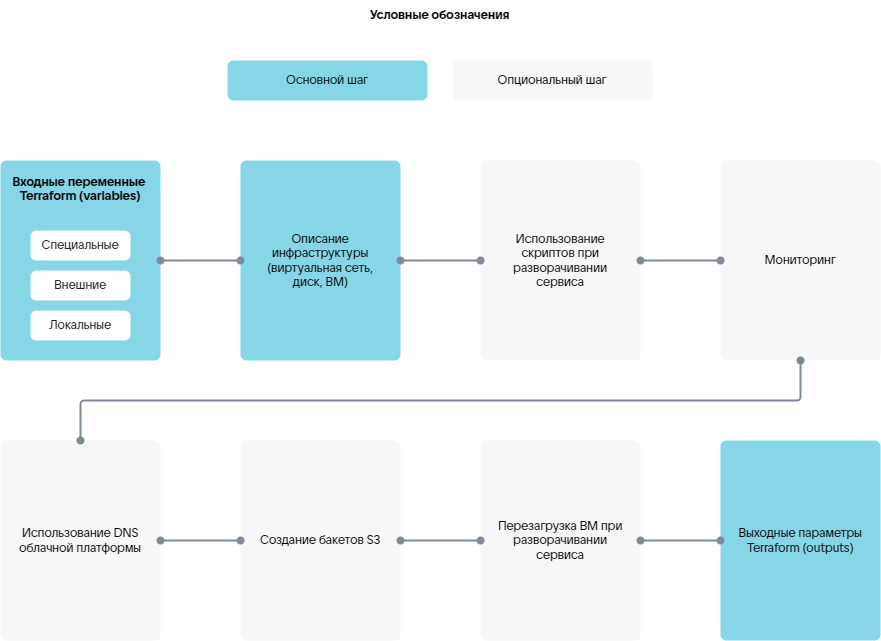
The main steps for deploying a service on a VM in the cloud platform:
- Describing input variables for resource configuration.
- Describing the infrastructure.
- Describing output parameters.
Additional capabilities:
-
- Executing scripts during service deployment or reinstallation.
- Using script execution results by other manifest resources.
- Retrieving script execution results.
-
Using the cloud platform DNS (for details, see the VK CS Infra (iVK CS) provider reference section).
-
Creating VK Object Storage buckets (for details, see the VK CS Infra (iVK CS) provider reference section). The created buckets will be displayed in the cloud platform management console.
-
Rebooting the VM during service deployment (for details, see the VK CS Infra (iVK CS) provider reference section).
Additional capabilities are provided by the resources of the iVK CS provider.
VM monitoring and script usage are provided by special services (for details, see the section Uploading a service package to the store) that the iVK CS provider interacts with:
- Configuration management service.
- Agent.
The prepared manifest is uploaded to the deployment system as part of a service package (for details, see the section Uploading an image-based application to the store).
Below is a manifest for deploying a Grafana service on a single VM using:
- External IP addresses.
- Cloud platform DNS.
- Address availability monitoring.
# --------------------variables--------------------# Special variables# Service deployment identifiervariable "instance_uuid" {type = stringdefault = "4a57a965-3c83-436c-80e2-428e421538cc"}variable "email" {type = stringdefault = "user@example.com"}# External variables# Placement with an external or internal IP addressvariable "grafana_placement" {type = stringdefault = "internal"}# Backupvariable "backup_style" {type = stringdefault = "s3"}# Availability zonevariable "ds-az" {type = stringdefault = "ME1"}# VM typevariable "ds-flavor" {type = stringdefault = "a493b27d-170d-48eb-a24b-99e9b325f988"}# Subnet identifiervariable "ds-subnet" {type = stringdefault = "cd4224ac-0527-4291-a8e0-afae0cee02ed"}# Root disk typevariable "root_type" {type = stringdefault = "ceph-ssd"}# Root disk size, GBvariable "root_size" {type = numberdefault = 10}# Data storage disk typevariable "data_type" {type = stringdefault = "ceph-ssd"}# Data storage disk size, GBvariable "data_size" {type = numberdefault = 1}# Service image identifiervariable "image_uuid" {type = stringdefault = "8c7a6443-bb79-4f04-884a-14231f0ba6cb"description = "grafana image"}# Access ports for the security groupvariable "ports" {type = list(number)default = [22, 80, 443]description = "ports for secgroup rule. grafana [80, 443]"}locals {# Shortened version of instance_uuidshort_name = substr(var.instance_uuid, 0, 8)# Hostname generationhosts_name = "${local.short_name}-grafana"}# ---------------------data------------------------# Retrieving virtual network datadata "vkcs_networking_subnet" subnet {id = var.ds-subnet}# --------------------backup-----------------------# Creating VK Object Storage bucketsresource "ivkcs_s3" "s3_backup" {count = var.backup_style == "s3" ? 1 : 0name = "${local.hosts_name}-backup"}# --------------------security group---------------# Creating a security groupresource "vkcs_networking_secgroup" "secgroup" {name = "${local.short_name}-grafana"sdn = data.vkcs_networking_subnet.subnet.sdn}# Security group rulesresource "vkcs_networking_secgroup_rule" "rules" {count = length(var.ports)# Determining the direction of rule application — for incoming (ingress) or outgoing (egress) connectionsdirection = "ingress"# List of access portsport_range_max = element(var.ports, count.index)port_range_min = element(var.ports, count.index)# Access protocolprotocol = "tcp"# Remote network prefixremote_ip_prefix = "0.0.0.0/0"# Identifier of the security group for which the rules are createdsecurity_group_id = vkcs_networking_secgroup.secgroup.iddescription = "rule_tcp_${element(var.ports, count.index)}"}# --------------------network----------------------# Binding an IP address to a portresource "vkcs_networking_port" "ports" {name = "${local.short_name}-grafana"admin_state_up = "true"network_id = data.vkcs_networking_subnet.subnet.network_idsdn = data.vkcs_networking_subnet.subnet.sdnsecurity_group_ids = [vkcs_networking_secgroup.secgroup.id]fixed_ip {subnet_id = var.ds-subnet}}# --------------------keypair----------------------# Creating a key pairresource "ivkcs_ssh_keypair" "keypair" {}# --------------------------vm---------------------# Creating a cloud-config configuration. Retrieving data for initializing the agent on the hostresource "ivkcs_user_data" "user_data" {# Service deployment identifieruuid = var.instance_uuidhosts = [local.hosts_name]target_os = "almalinux9"# SSH access keysssh_authorized_keys = [ivkcs_ssh_keypair.keypair.public_key,]}# Creating a VMresource "vkcs_compute_instance" "grafana" {name = local.hosts_nameflavor_id = var.ds-flavorsecurity_groups = [vkcs_networking_secgroup.secgroup.name]availability_zone = var.ds-azmetadata = { "sid" : "xaas", "product" : "grafana" }# Root diskblock_device {source_type = "volume"destination_type = "volume"boot_index = 0uuid = vkcs_blockstorage_volume.boot.id}# Applying the cloud-config configuration to configure the VM. Installing the agentuser_data = ivkcs_user_data.user_data.user_data[0]# Attaching an IP address to the VMnetwork {port = vkcs_networking_port.ports.id}# Attempting to stop the VM before deletionstop_before_destroy = true# VM creation timeouttimeouts {create = "10m"}}# --------------------volume-----------------------# Creating a root diskresource "vkcs_blockstorage_volume" "boot" {name = "${local.short_name}-grafana-boot"# Metadatametadata = { "sid" : "xaas", "product" : "grafana" }# Service image identifierimage_id = var.image_uuidvolume_type = var.root_typesize = var.root_sizeavailability_zone = var.ds-az}# Creating a data diskresource "vkcs_blockstorage_volume" "grafana_data" {name = "${local.short_name}-grafana-data"# Metadatametadata = { "sid" : "xaas", "product" : "grafana" }size = var.data_sizeavailability_zone = var.ds-azvolume_type = var.data_type}# Attaching the data disk to the VMresource "vkcs_compute_volume_attach" "attached" {instance_id = vkcs_compute_instance.grafana.idvolume_id = vkcs_blockstorage_volume.grafana_data.id}# -----------------------external------------------# Retrieving the pool of external IP addressesresource "vkcs_networking_floatingip" "fips" {count = var.grafana_placement == "external" ? 1 : 0pool = data.vkcs_networking_subnet.subnet.sdn == "neutron" ? "ext-net" : "internet"}# Assigning an external IP address to the VMresource "vkcs_compute_floatingip_associate" "fip" {count = length(vkcs_networking_floatingip.fips)floating_ip = vkcs_networking_floatingip.fips[count.index].addressinstance_id = vkcs_compute_instance.grafana.id}# Creating an A record in the cloud platform DNSresource "ivkcs_dns" "grafana" {count = length(vkcs_networking_floatingip.fips)name = "grafana-${local.short_name}"domain = "xaas.msk.vkcs.cloud"ip = vkcs_networking_floatingip.fips[count.index].address}# --------------------agent-run--------------------locals {grafana_domain = var.grafana_placement == "external" ? "${ivkcs_dns.grafana[0].name}.${ivkcs_dns.grafana[0].domain}" : vkcs_compute_instance.grafana.access_ip_v4grafana_root_url = var.grafana_placement == "external" ? "https://${local.grafana_domain}" : "http://${local.grafana_domain}"# Startup script for the ivkcs_agent_exec.start resourcestart = <<-EOT#!/bin/bashansible-playbook start.yml \--extra-vars "lego_enabled=${var.grafana_placement == "external" ? "true" : "false"}" \--extra-vars "lego_email=${var.email}" \--extra-vars "backup_enabled=${var.backup_style == "s3" ? "true" : "false"}" \--extra-vars "backup_access_token=${try(ivkcs_s3.s3_backup[0].access, "n/a")}" \--extra-vars "backup_secret_token=${try(ivkcs_s3.s3_backup[0].secret, "n/a")}" \--extra-vars "backup_bucket_name=${try(ivkcs_s3.s3_backup[0].name, "n/a")}_bucket" \--extra-vars "grafana_domain=${local.grafana_domain}" \--extra-vars "grafana_root_url=${local.grafana_root_url}"EOT}resource "ivkcs_agent_exec" "start" {hosts = [local.hosts_name]name = "start_grafana"uuid = var.instance_uuidstep {index = 1type = "bash"content = local.startoptions {timeout = "20m"cwd = "/opt/playbooks"attempts = 1}}depends_on = [vkcs_compute_instance.grafana,vkcs_compute_volume_attach.attached,]}# --------------------health check-----------------# VM monitoringresource "ivkcs_agent_check" "health" {hosts = [local.hosts_name]uuid = var.instance_uuid# Address-based monitoringhttp_health {method = "GET"protocol = var.grafana_placement == "internal" ? "http" : "https"host = local.grafana_domainpath = "/api/health"http_codes = [200]period = "30s"}timeouts {create = "5m"}depends_on = [ivkcs_agent_exec.start,]}# --------------------outputs----------------------# Outputting the private SSH key for accessing the VMoutput "keypair" {value = ivkcs_ssh_keypair.keypair.private_key# The output parameter contains sensitive datasensitive = true}# Outputting the Grafana URLoutput "grafana_url" {value = local.grafana_root_url}# Outputting the VK Object Storage bucket identifieroutput "s3_backup" {value = try(ivkcs_s3.s3_backup[0].id, "n/a")}