
Uploading an image-based application to MarketplaceBeta
Uploading the service package of an image-based application to the Marketplace is performed using the deployment system via the Infra API service. The process involves the following VK Cloud platform components:
Name | Description |
|---|---|
Infra API | Is the integration point between the marketplace and the VK Cloud platform for deploying image-based applications. Infra API validates the data of the user uploading a service package or deploying a service instance. After successful validation, Infra API gains access to interservice communication to create the resources described in the Terraform manifest. Infra API interacts with the deployment system and the configuration management service |
Deployment system | Provides deployment of the image-based application on VMs in VK Cloud. Manages the infrastructure and software of the service |
Image-based broker | Manages the lifecycle of a service instance, including tenants. Tenants group image-based applications of a single vendor ( |
Configuration system | A server that stores:
Provides access to the current version of the agent installed on the VM |
Marketplace Agent | Software installed on the VM during service deployment. For more details, see the section Marketplace Agent |
Service package (VK Cloud product package) | A structured set of YAML files and Terraform manifests |
Below is a diagram of the interaction between the listed components during the upload of an image-based application.
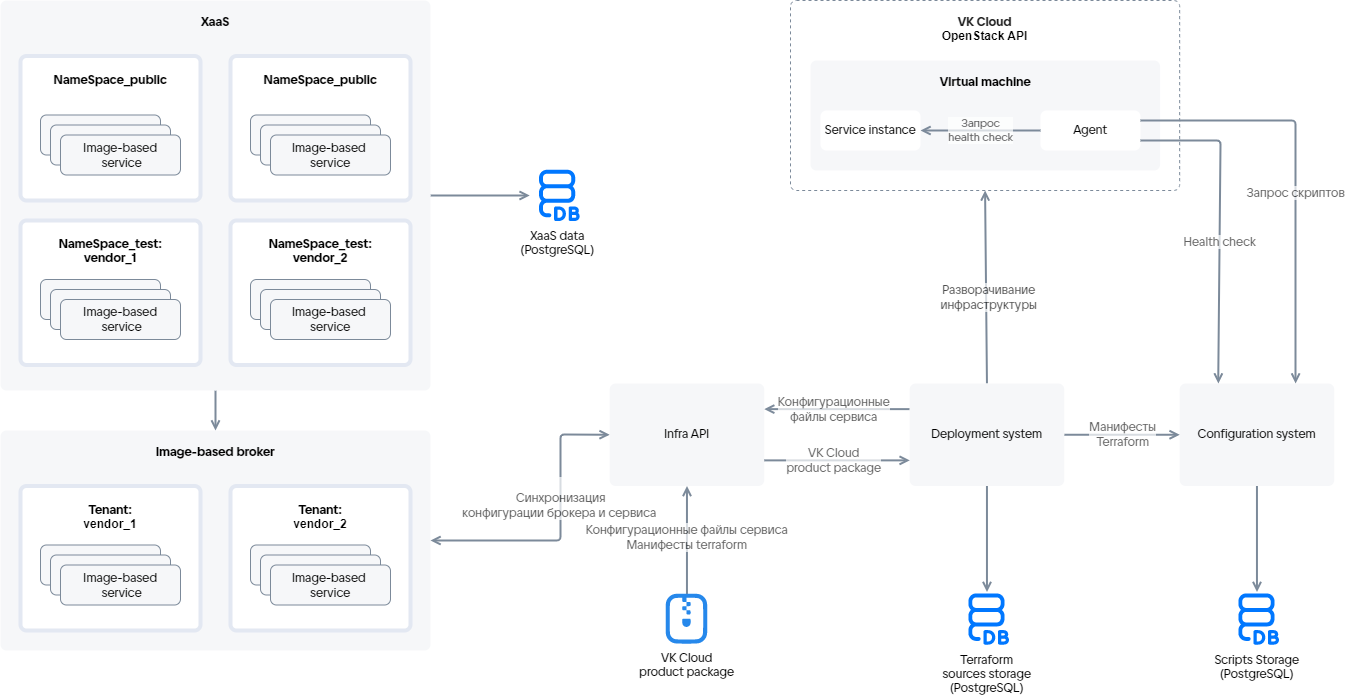
In the diagram, NameSpace_test and NameSpace_public are the test and public namespaces of the Marketplace. They are specified for each service in the service key, which the vendor receives from the Marketplace when preparing for the upload.